June 1, 2026
Event Production Budget: A Complete Planning Guide
Learn how to build, track, and manage an event production budget from first estimate to final reconciliation. Covers the full budgeting lifecycle for production managers.
By John Barker

You’ve just been handed the budget responsibility for a production. Maybe it’s a $15,000 corporate meeting or a $500,000 festival. Either way, the question is the same: how do you turn a number into a plan — and then keep that plan on track as reality unfolds?
This guide isn’t about listing what things cost (that varies wildly by market, scale, and scope). It’s about the process of building a budget that’s defensible, tracking it as money flows, and closing it out with lessons for next time.
The budgeting mindset
A budget is a hypothesis about what your production will cost. Like any hypothesis, it gets more accurate as you gather data. Early estimates based on “last year’s event was about $X” are useful starting points, but they should be replaced with vendor quotes and confirmed costs as soon as possible.
The goal isn’t to be right on day one — it’s to converge on reality as quickly as possible and flag problems early.
Phase 1: The estimate
Start with scope, not numbers
Before opening a spreadsheet, answer these questions:
- How many days?
- How many attendees?
- Indoor or outdoor?
- What’s the technical complexity? (A keynote with slides vs. a multi-camera live stream are different universes.)
- Are there accommodation and travel requirements?
- Is this a repeat event (past data available) or a first-time production?
These answers determine which budget categories are relevant and roughly how much each will cost. A simple indoor corporate event might have 6 categories; a multi-day outdoor festival might have 20+.
Quote everything you can
The single biggest budgeting mistake is estimating what you could quote. Venue? Get a quote. AV? Get a quote. Catering? Get a quote. Even if you haven’t selected the final vendor, a ballpark quote from any reputable supplier is more accurate than your gut feeling.
Get at least two quotes for major line items. This gives you a range and bargaining leverage.
Estimate what you can’t quote
For items too small to quote individually (consumables, miscellaneous supplies, tips) or too early to spec (contingency items), use past event data. If you don’t have past data, use the 20% rule: whatever you think it’ll cost, add 20%.
Build in contingency
This is non-negotiable. No production budget should exist without a contingency line:
- 10% for straightforward, repeatable events
- 15% for complex or first-time events
- 20% for high-risk productions (outdoor, international, untested venues)
Contingency is not a slush fund or a profit margin. It’s a recognition that production is unpredictable, and a way to absorb shocks without derailing the event.

Phase 2: Approval and communication
Present the budget clearly
Stakeholders aren’t production people. Present your budget in categories they can understand, with a clear total and a stated contingency. Explain what’s included and — critically — what’s NOT included.
“This budget covers full AV production, crew for 3 days, and catering for 25 crew. It does NOT include guest catering, marketing, or speaker travel.” That clarity prevents scope-creep arguments later.
Establish change control
Once the budget is approved, establish who can authorize additional spending and at what threshold. Can the production manager approve a $500 equipment rental? What about $5,000? Define this upfront so decisions don’t stall on event day.
Phase 3: Tracking
Estimated vs. actual
Every line item should have two numbers:
- Estimated — Your pre-production figure (from quotes or estimates)
- Actual — The real cost once confirmed/invoiced
The difference is your variance. Track it per line item and per category.
When to update actuals
Update your budget when:
- A vendor quote is confirmed (estimate → confirmed estimate)
- A contract is signed (confirmed estimate → committed cost)
- An invoice arrives (committed → actual)
- An unplanned expense occurs (new line item with actual only)
Warning signals
Watch for:
- Any category >10% over estimate — investigate immediately
- Contingency being tapped before 50% of planning is complete — you may need a scope conversation
- Multiple small overages adding up — $200 here and $300 there becomes $3,000 before you notice
Production tools with built-in budget tracking (like ProductionPlanner.io) calculate variance automatically as you enter actuals, and show category-level health at a glance — no manual spreadsheet math required.
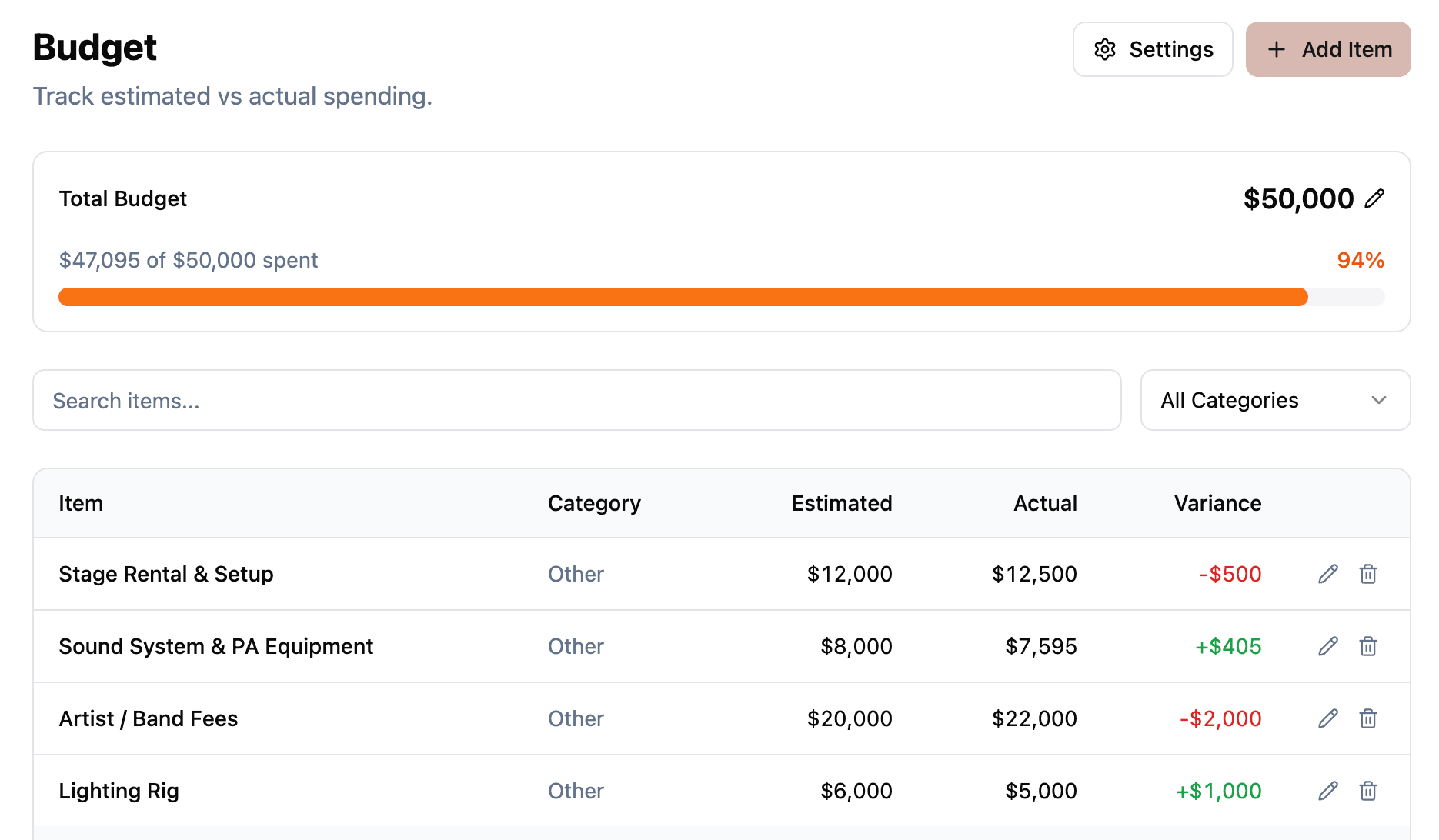 Figure: Estimated vs. actual tracking with category-level totals and variance calculated automatically.
Phase 4: Reconciliation
After the event, close your budget:
- Collect all final invoices — Chase any outstanding ones. Set a deadline (2 weeks post-event).
- Update every line item with actuals — No “estimated” figures should remain.
- Calculate final variance — Total spend vs. original approved budget.
- Document contingency usage — What was it spent on? Was it enough?
- Write budget notes — What was over? What was under? Why? These notes are gold for your next production.
The 3-event rule
Your first budget for a given event type is always the roughest estimate. By the third time you run a similar production, your estimates will be within 5% of actuals. Reconciliation data is what makes this improvement possible — skip it and you restart from guesswork every time.
Common traps
The “all-in” quote that isn’t — Vendors sometimes exclude transport, overtime, and consumables from their “all-in” quote. Always ask: “What’s NOT included?”
Crew overtime — Budget for at least 2 hours of overtime per day. If the show runs long, if strike takes longer than planned, if the client adds a last-minute rehearsal — it all costs 1.5x per hour for everyone on the clock.
The forgotten 48 hours — Producers often budget for the event day but forget the day before (setup) and the day after (strike). Both have costs: crew, venue, catering, equipment rental.
Scope creep without budget creep — When a stakeholder says “can we also add…” the answer should always include “yes, and that will cost approximately $X.” Never absorb scope changes into the existing budget without flagging them.
A note on tools
Spreadsheets work for simple budgets but create problems at scale: version conflicts, formula errors, no real-time collaboration, and no link between budget and production schedule.
Purpose-built production planning tools connect your budget to your project timeline and team. When a schedule change implies a cost change (overtime, extended venue rental, additional equipment day), you can update both in the same place.
The bottom line
Budgeting is a continuous process, not a one-time document. Build it early, refine it as quotes arrive, track it as money flows, and close it out with data that makes your next budget better. The producers with the best track records aren’t the ones who guess right — they’re the ones who track rigorously and learn from every event.
Stay in the loop
Get product updates when new features ship. No spam, unsubscribe anytime.